Where vs. WhereBulkContains: What’s the real difference in EF Core?
When working with Entity Framework Core, filtering entities using .Where(x => ids.Contains(x.Id)) feels completely natural. It’s clean, readable, and works perfectly for small datasets.
Until one day it doesn’t.
In real-world systems -data synchronization jobs, reporting pipelines, or integrations with third-party APIs - this seemingly harmless pattern can quietly push your application over the edge. Queries suddenly fail, memory usage spikes, and SQL Server starts throwing errors that only appear under load.
In this article, we’ll look at a real production scenario where .Where().Contains() becomes a silent killer, explain why it breaks at scale, and walk through a high-performance alternative using WhereBulkContains that avoids SQL Server’s infamous 2100 parameter limit entirely.
The real-world scenario
You decide to display detailed product information on your website to attract more leads.
Data comes from a third-party API, returning around 10,000 records, which are linked to users in your database via email.
Instead of showing only static testimonials, you want to enrich them with:
- user image
- username
- product metadata
The common EF Core approach looks like this:
var productIds = await GetProductIdsFromCSV();

var products = await dbContext.Products
    .Where(p => productIds.Contains(p.Id))
    .ToListAsync();
At first glance, nothing seems wrong.
But the silent killer is hiding right here.
How .Where() + .Contains() works?
EF Core translates the LINQ query above into SQL similar to this:
SELECT [e].[Id], [e].[Name], [e].[Price]
FROM [Products] AS [e]
WHERE [e].[Id] IN (@p0, @p1, @p2, @p3, @p4, ... @p9999);
EF Core parameterizes each value to protect against SQL injection, which is normally a good thing.
However, this approach does not scale.
- SQL Server’s 2100 parameter limit:
SQL Server enforces a strict limit of 2,100 parameters per batch.
This limitation comes from the Tabular Data Stream (TDS) protocol used for client-server communication.meters per batch. Each value inside.Contains()becomes a separate SQL parameter. - Expression tree memory overhead: Before sending anything to the database, EF Core must build an expression tree representing the query. For large collections, this means:
- Thousands of comparison nodes
- A massive object graph
- Increased memory pressure
- Frequent Garbage Collection (GC)
- Query plan cache pollution: SQL Server treats queries with different numbers of parameters as different queries. That means:
IN (10 params)≠IN (500 params)- Each variation generates a new execution plan
- The plan cache fills with near-identical queries
- The "wall of text" problem: A query with thousands of parameters easily exceeds 2 MB in size. This leads to:
- Increased network latency
- More CPU spent parsing SQL
- Higher execution startup costs
The database must first read and parse this enormous query string before it can even decide how to execute it.
A better approach: WhereBulkContains method
This is where WhereBulkConatinsfrom Z.EntityFramework.Extensions comes in.
using Z.EntityFramework.Extensions;

var productIds = await GetProductIdsFromCSV();

var products = await dbContext.Products.WhereBulkContains(productIds)
                                       .ToListAsync();
The method automatically uses the entity’s primary key.
There is possibility to filter by another parameter:
using Z.EntityFramework.Extensions;

var products = await GetProductIdsFromCSV();

var products = await dbContext.Products.WhereBulkContains(products, x => x.SKU)
                                       .ToListAsync();
Under the hood of WhereBulkContains
Unlike .Contains(), this method uses a temporary structure and a JOIN-based strategy.
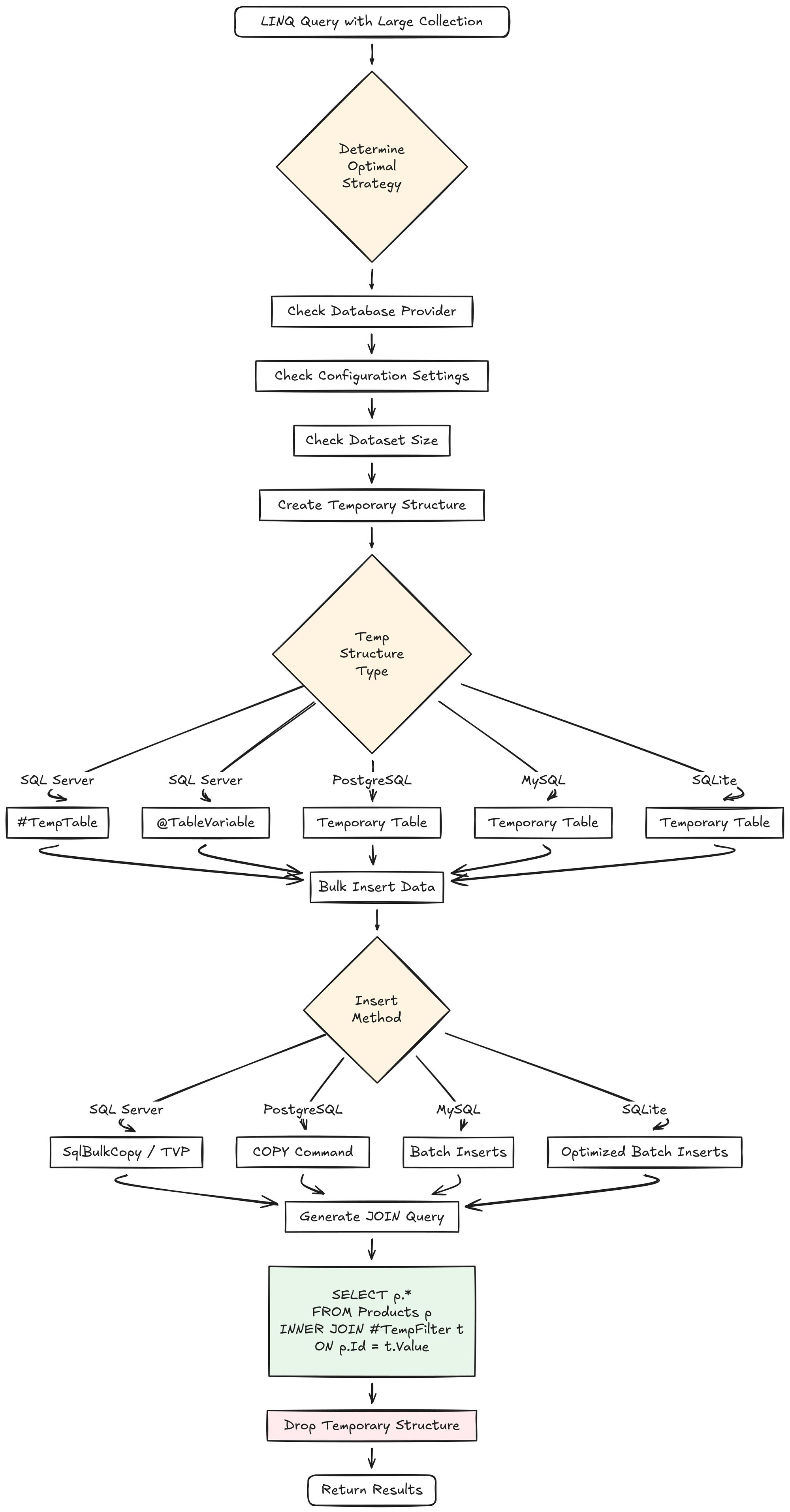
This is a 4 steps process:
- 1. Temporary structure creation
The exact structure depends on:
- Database provider (SQL Server, PostgreSQL, MySQL, etc.)
- Configuration settings
- Dataset size
2. Bulk data insertion
The collection is inserted using the fastest mechanism available:
- SQL Server:
SqlBulkCopyor Table-Valued Parameters (TVP) - PostgreSQL:
COPY - MySQL: batch inserts
- SQLite: optimized batch operations
3. JOIN-based query execution
SELECT p.*
FROM Products p
INNER JOIN #TempFilter t ON p.Id = t.Value;
This allows the database engine to use highly optimized join algorithms and indexes.
4. Automatic cleanup
Temporary structures are dropped automatically after execution.
Advanced capabilities
The power of WhereBulkContains lies in its ability to handle complex data scenarios that typically bring EF Core queries to a halt.
Composite key matching
For entities identified by multiple columns:
var products = await context.Products
    .WhereBulkContains(productKeys, p => new
    {
        p.WarehouseId,
        p.ProductCode
    })
    .ToListAsync();
A multi-column temporary table is created, and the join uses the correct composite index.
Entity & anonymous type support
You can pass:
- Full entities (
List<Product>) - Anonymous types
- Custom objects matching key properties
The library inspects your EF Core configuration and automatically extracts the relevant key values.
Deferred execution (IQueryable support)
Unlike many bulk libraries, WhereBulkContains returns IQueryable<T>.
That means you can still use:
.Include()for eager loading- Additional
.Where()filters .Select()projections
var filteredProducts = await context.Products
    .WhereBulkContains(productIds, p => p.Id)
    .Where(p => p.Category == category)
    .Where(p => p.Price >= minPrice)
    .Where(p => p.IsActive && !p.IsDiscontinued)
    .Include(p => p.Supplier)
    .ToListAsync();
All of this executes as a single optimized SQL query.
var filteredProducts = await context.Products
                                    .WhereBulkContains(productIds, p => p.Id)
                                    .Where(p => p.Category == category)
                                    .Where(p => p.Price >= minPrice)
                                    .Where(p => p.IsActive && !p.IsDiscontinued)
                                    .Include(p => p.Supplier)
                                    .ToListAsync();
.Contains() vs WhereBulkContains
| Feature | Where + Contains | WhereBulkContains |
|---|---|---|
| SQL Strategy | IN clause with parameters |
Temp table + JOIN |
| Parameter Limit | 2,100 (SQL Server) | No limit |
| Small Lists (< 100) | Fast | Slightly slower (temp table overhead) |
| Large Lists (> 1,000) | Slow or fails | Very fast |
| Composite Keys | Painful | Clean and fast |
| Query Plan Cache | Pollutes cache | Single reusable plan |
| Expression Tree | Massive overhead | Minimal overhead |
| Setup Required | Native EF Core | Z.EntityFramework.Extensions |
| Cost | Free | Commercial license(free trial available) |
When not to use WhereBulkContains
- Small, UI-driven filters
- Very low-latency queries where temp table setup outweighs benefits
- Projects where introducing a commercial dependency is not acceptable
For small datasets, .Contains() is still the simplest and fastest solution.
Summary
Choosing between .Contains() and WhereBulkContains isn’t about which one is better — it’s about scale.
.Contains()is perfect for small, interactive filters- It becomes dangerous with thousands of values
- SQL Server’s 2100-parameter limit is a hard wall
WhereBulkContainstrades a small amount of complexity for massive gains in stability and performance
If your application processes large datasets—data synchronization, bulk updates, reporting, or imports—this approach ensures you never hit parameter limits or bloat your database’s memory.
Make SQL Profiler and EF Core logging your friends. Measure what your queries actually do, and choose the right tool for the job.